 Physix Frontier
Built a Codex Skill to convert short videos into illustrated tutorials

I turned "breaking down short videos into illustrated tutorials" into a Codex Skill
Even if you can't write tutorials or capture key steps, you can organize Douyin and Xiaohongshu content into real, replicable illustrated articles.
Figure 1: Video Tutorial Skill, from creator links to deliverable illustrated tutorials.
When many people see a good AI video or tutorial, their first reaction is: "Can I turn this into an article?"
But once you actually start, problems arise immediately: What tools were used in the video? Which steps did the creator explicitly mention? Which ones are just our guesses based on the visuals? How do we choose screenshots, avoid subtitles, and copy prompts and parameters?
If you throw all these questions at a standard AI, it easily writes an article that "looks complete but is unverifiable." Software, models, parameters, and even the creator's hidden workflows might be automatically filled in with hallucinations.
So, I organized my repeated workflow for breaking down videos into an open-source Skill installable in Codex: Video Tutorial Skill.
It doesn't just summarize the video; it turns "judging content—verifying evidence—recommending plans—waiting for confirmation—creating tutorials—evaluating replicability—delivering Word docs" into a stable process.
01|What exactly does this Skill do?
It targets Douyin, Xiaohongshu, and other short video or creator pages, with one goal: Organize source content into Chinese illustrated tutorials that beginners can follow.
After receiving a link, it doesn't start writing immediately. Instead, it first judges which category the content belongs to:
- Tutorial type: Faithfully restores the operation sequence, inputs, buttons, parameters, and results shown in the video as much as possible.
- Showcase type: Analyzes character consistency, visual style, storyboarding, camera language, motion, editing, and sound, then designs a feasible replication route.
- Tool disclosure type: Prioritizes tools explicitly disclosed by the creator; for undisclosed parts, they are labeled as inferences or our replication plans.
- Insufficient evidence: Clearly tells you what is missing (screen recordings, screenshots, or text) rather than filling gaps with guesses.
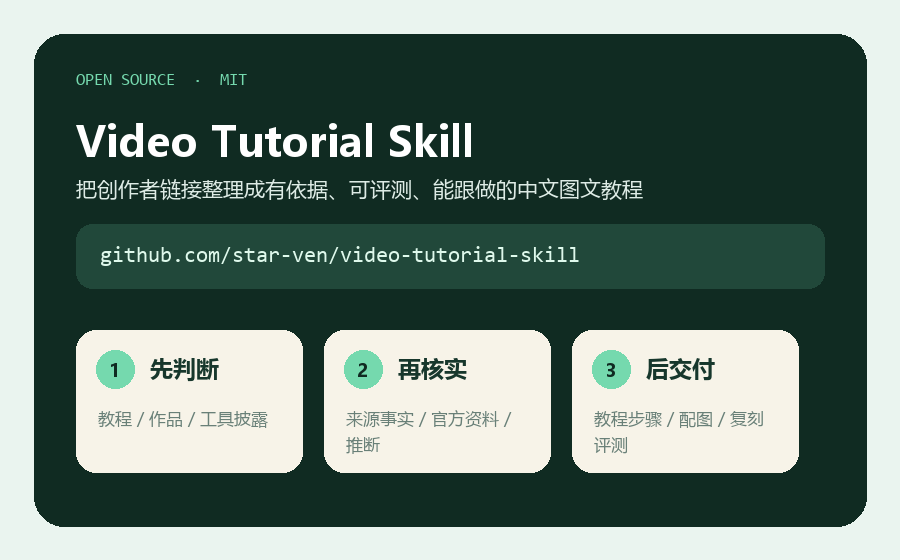
Figure 2: This is an MIT open-source Skill; the repository includes workflows, formatting standards, and validation scripts.
It also categorizes information in the article into four layers: facts from source visuals, creator disclosures, current official documentation, and our replication plans. This way, readers understand "what actually appeared in the video" and know "which steps were redesigned to replicate similar works."
02|How to install? Recommended: Use Skill Installer first
OpenAI's official documentation states that a Skill is essentially a directory containing SKILL.md, which can include reference materials, scripts, and resources. Codex can either explicitly call a Skill or match it automatically based on task descriptions.
The easiest installation method is to enter this in Codex:
$skill-installer
Please install this Skill from https://github.com/star-ven/video-tutorial-skill.
If you want team members in a project to share it, you can also place the repo in the project's .agents/skills/video-tutorial-skill directory:
git clone https://github.com/star-ven/video-tutorial-skill.git \
.agents/skills/video-tutorial-skill
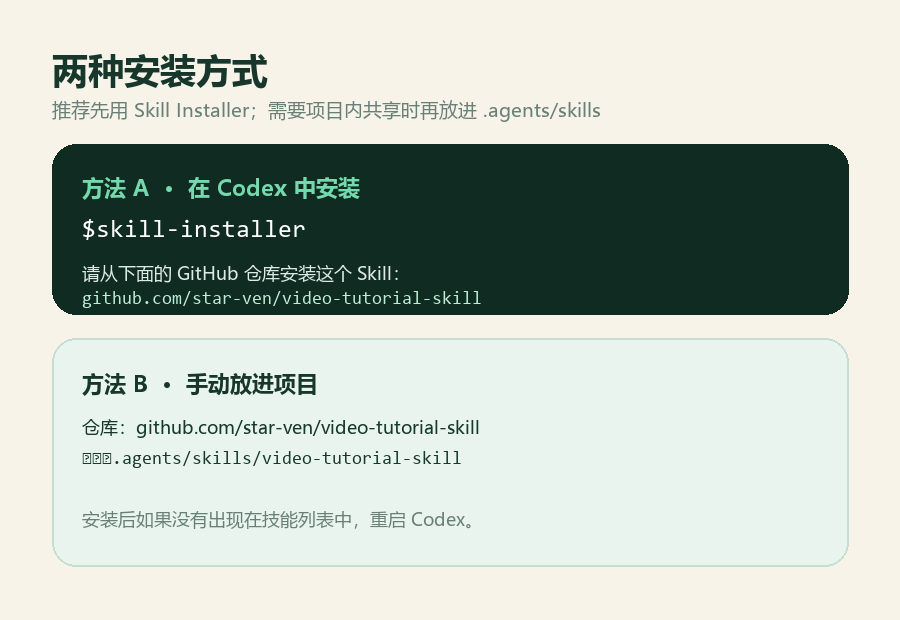
Figure 3: For personal use, Skill Installer is recommended; for project sharing, put it in .agents/skills.
If it doesn't appear in the skill list immediately after installation, restart Codex. You can also type $ to search for installed Skills, or run /skills in Codex CLI or IDE extensions to view them.
Note: This is an independent open-source workflow Skill, not an official built-in Skill released by OpenAI; it uses the Skill mechanism officially supported by Codex.
03|How to use it for the first time? Just copy this prompt
Explicit invocation is the most stable. Create a new task and send the creator link along with this prompt to Codex:
$video-tutorial-skill
This is a Douyin / Xiaohongshu creator link.
Please first judge whether it is a tutorial, showcase, or tool disclosure,
and recommend a replication route, breakdown focus, length, and image plan.
After I confirm, create an illustrated tutorial Word doc that beginners can follow.
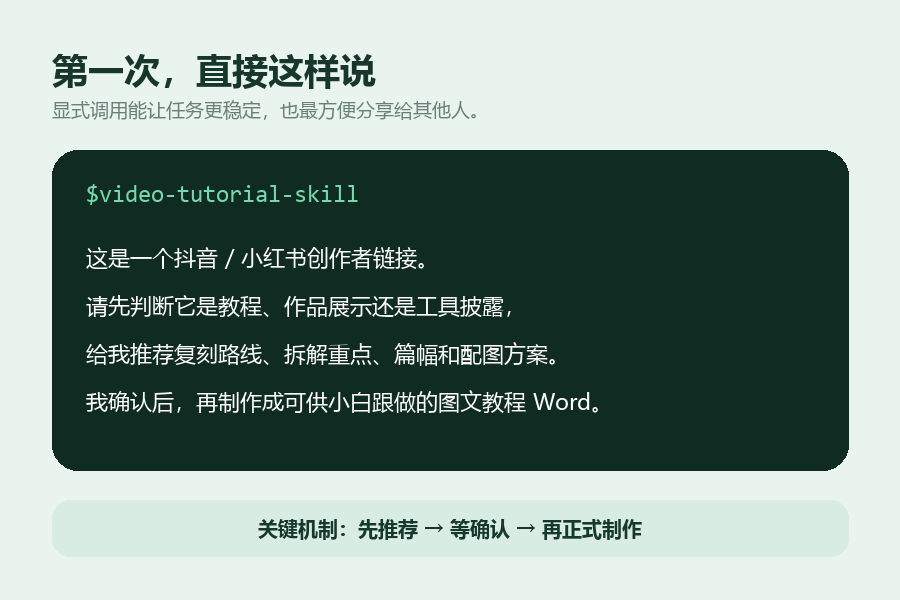
Figure 4: When using it for the first time, ask it to recommend a plan first; don't let it write the final article directly.
The most important thing here isn't how long the prompt is, but "recommend first, then create." The Skill will first tell you: what it judges the content to be, what tools it plans to use, the article's focus, how many images are needed, the estimated length, and where evidence is insufficient.
Only after you confirm does it proceed to formal creation. This step avoids realizing after several pages that the route is completely different from what you wanted.
04|Three common tasks, ready to copy-paste
Scenario 1: The original video is itself a tutorial.
Organize operational steps according to the actual video order. For each step, specify what input is required, where to click, and the expected result.
If the current software interface differs from the video, separately note version differences; do not invent non-existent buttons.
Scenario 2: The video only shows the final work.
First analyze character consistency, storyboarding, camera language, motion, editing, sound, and visual style,
then select currently available tools to design a replication tutorial for creating similar works.
Do not claim this is the creator's original operation.
Scenario 3: The creator only revealed some tools.
The creator explicitly stated using Jimeng, LIBTV, and Midjourney.
Please prioritize designing the replication route with these tools; label undisclosed steps as "our replication plan,"
and do not fabricate the creator's models, parameters, or prompts.
05|What happens after you send the link?
The entire process is not "one-shot generation" but six stages: check source, judge content, submit recommendation, wait for confirmation, formal creation, review and delivery.
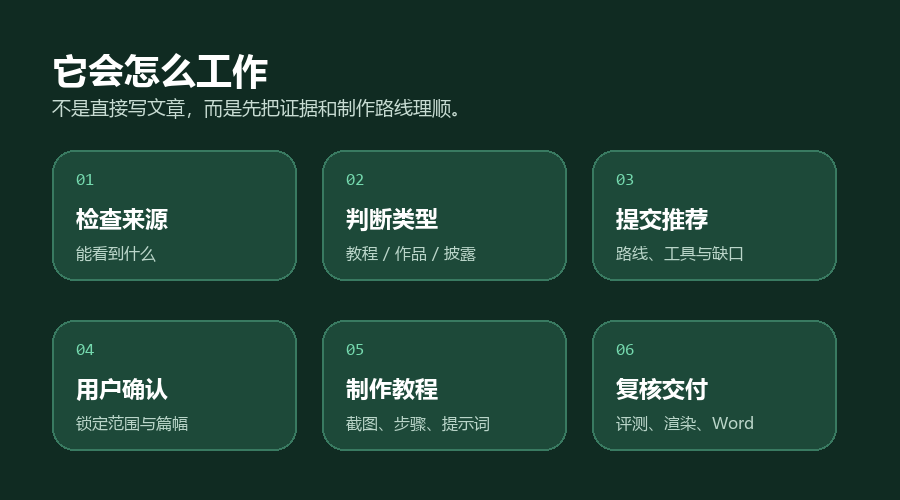
Figure 5: Every new work goes through judgment and recommendation first; article creation begins only after confirmation.
During formal creation, it prioritizes selecting original video frames not obscured by subtitles; if necessary, it crops subtitle areas instead of replacing real footage with generated images. Images and captions are centered, without distracting box markers, and no mind maps are created.
The article first provides a conclusion on "whether it can be replicated and to what extent," followed by specific steps, copyable prompts, troubleshooting, and limitations. Finally, it defaults to generating a compact Word document and performs page-by-page rendering checks.
06|For better results, provide this info
Besides the link, it's best to supplement four things:
1. Whether permission for reprinting or analysis has been obtained;
2. Whether the creator explicitly mentioned the tools used;
3. Whether you want a "faithful tutorial" or a "similar-style replication";
4. Whether the final output needs to be Word, a standard article, or just the breakdown conclusions.
If platform login, anti-scraping, or regional restrictions prevent full page reading, directly provide a screen recording, video file, subtitles, or key screenshots. The more complete the evidence, the closer the tutorial is to actual operations.
07|What do you get in the end?
The final result is not a video summary, but an illustrated tutorial that can be published and followed by others: with titles, real images, specific steps, copyable inputs, replication evaluations, and clear boundaries.
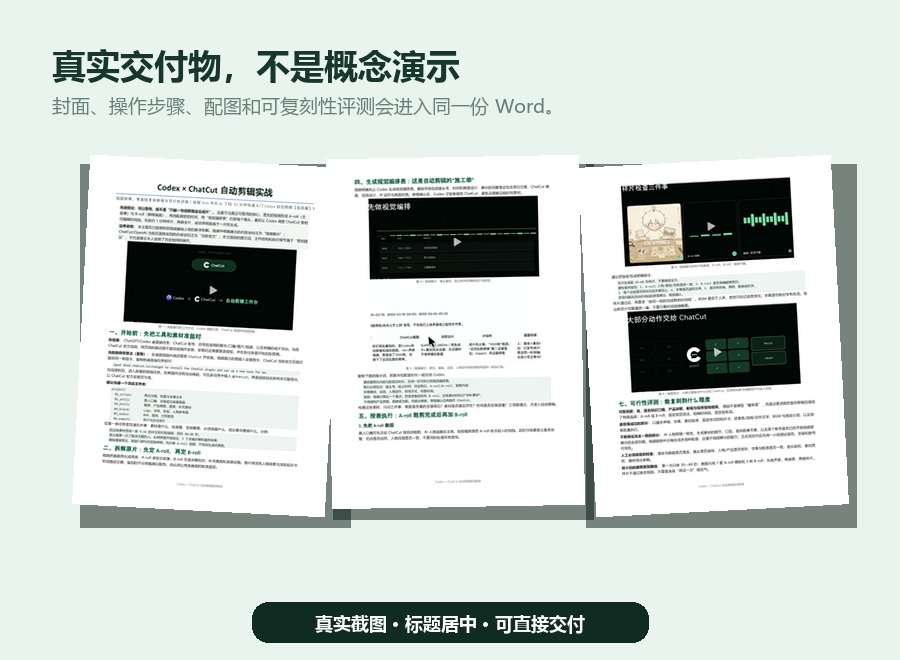
Figure 6: Real delivery example, integrating video breakdown, operational steps, images, and evaluation into one Word doc.
However, it makes two promises it won't break: First, it won't pass off inferences as facts; the replication plans in this article are not equal to the creator's original complete workflow. Second, it doesn't guarantee all platform links are directly accessible. When sources are insufficient, it should request supplementary materials rather than continuing to write.
This is the value of this Skill: It's not about making AI write more, but making it guess less, verify more, and write every step so others can truly replicate it.
08|Open Source Address & Usage Entry
GitHub: https://github.com/star-ven/video-tutorial-skill
In-site download: Physix Frontier | AI Reviews
OpenAI Official Skill Documentation: Build skills
If you often need to organize tutorial videos, AI works, or creator cases into illustrated content, you can install and use it directly. For the first time, don't bother researching directories and scripts; just remember one sentence:
Help me judge how to break down this video and which tools to use for replication first; create the illustrated tutorial after I confirm.
09|FAQ
Can it work with only platform links, no video files?
You can check the link first. If the page reads normally, organize evidence based on the video, subtitles, captions, and creator notes; if you encounter login, anti-scraping, or regional restrictions, supplement with screen recordings, original videos, subtitles, or key screenshots. The Skill should not treat unseen content as verified fact.
Do I have to type $video-tutorial-skill every time?
Not necessarily. This Skill allows automatic triggering based on task content, but explicit invocation yields more stable results and helps you confirm the specified workflow is being used.
Is Word the only output format?
No. Word is the default delivery format because it preserves images, titles, code blocks, and complete layout. You can also request output as a standard article, website draft, WeChat public account draft, or just the breakdown conclusions.
Why does it always ask me to confirm the plan first?
Because the same video can have completely different goals: faithful transcription, analyzing production methods, replicating similar styles, or just evaluating tool feasibility. Confirming the route first prevents the entire article from going in the wrong direction later and exposes insufficient evidence and version differences early.
Will others get exactly the same article as me after installing it?
No. The Skill fixes the judgment criteria, evidence boundaries, and delivery process, but the final content depends on source materials, user requirements, available tools, and current software versions. It's more like a reusable editorial standard than a fixed article template.
Leave the workflow to the Skill, keep the final judgment for yourself.

